How to complete your company info
Enter your business name, category and address under Settings > Company. Your address is where every delivery's round trip starts, so each order's mileage cost is measured from it.
Complete your company info
-
Go to Settings and click Company.
-
Under Company Information, enter the Company Name and choose a Business Category. Both are required. Add your logo and Tax ID / EIN if you like.
-
Under Contact Information, add your Company Email, Company Phone and Company Website. They're optional.
-
Under Business Address, start typing your street and pick it from the suggestions. Check that Street Address, City, State and ZIP Code are filled in. Use the place your deliveries leave from.
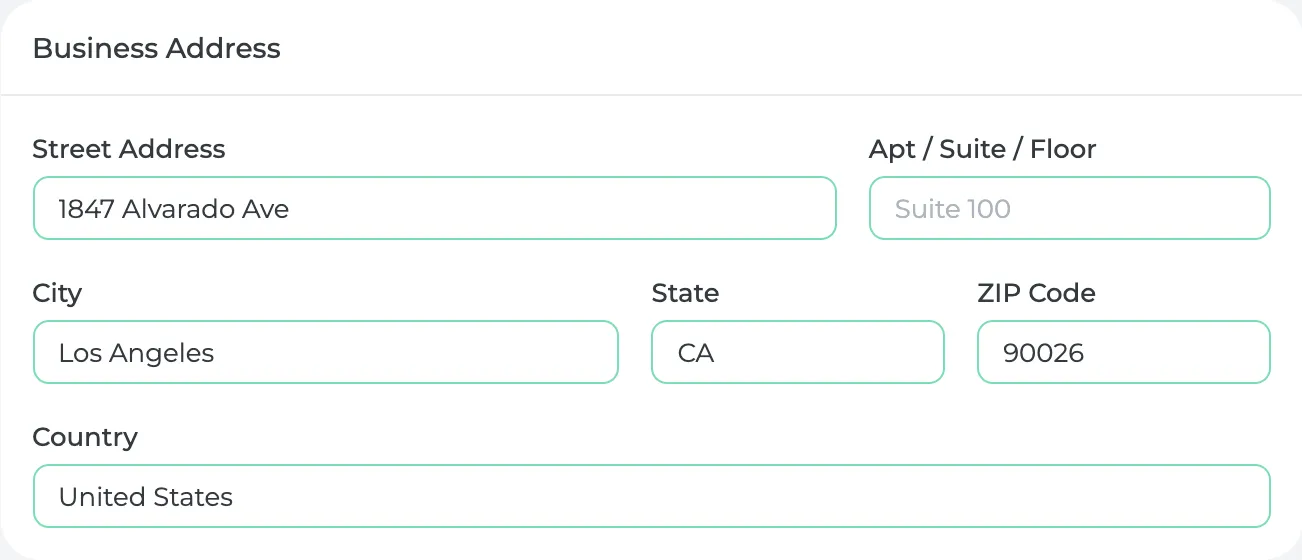
-
Click Save.
What you'll see
When you start a delivery sales order and pick a customer location, Prophitable measures the round trip from this address to the location and fills in Fuel & Mileage under Shipping & Handling. You can change the miles on any order.
The cost is the miles times your Cost Per Mile, which starts at $0.67 (the IRS rate for 2026). To change it, go to Settings, click Shipping and edit it under Mileage Settings.
Mileage needs a street, city and state on both addresses. If an order shows 0 miles, check the address here and on the customer's location.
Did this answer your question?
Thanks for letting me know.
Thanks. I read every one of these myself.