How to let customers order online
Set when orders close and which days you deliver, then invite a customer's buyer by email. They order from their own page, at their own prices, and the order lands in your Sales Orders by the cutoff with nothing to retype.
Online ordering is part of the Growth plan.
Set your ordering schedule
-
Go to Settings and click Ordering Schedule.
-
Under When Orders Close, choose Cutoffs:
- Same every day: set Orders close to how many days before delivery, and the time.
- Different each day: set a cutoff on each delivery day below.
-
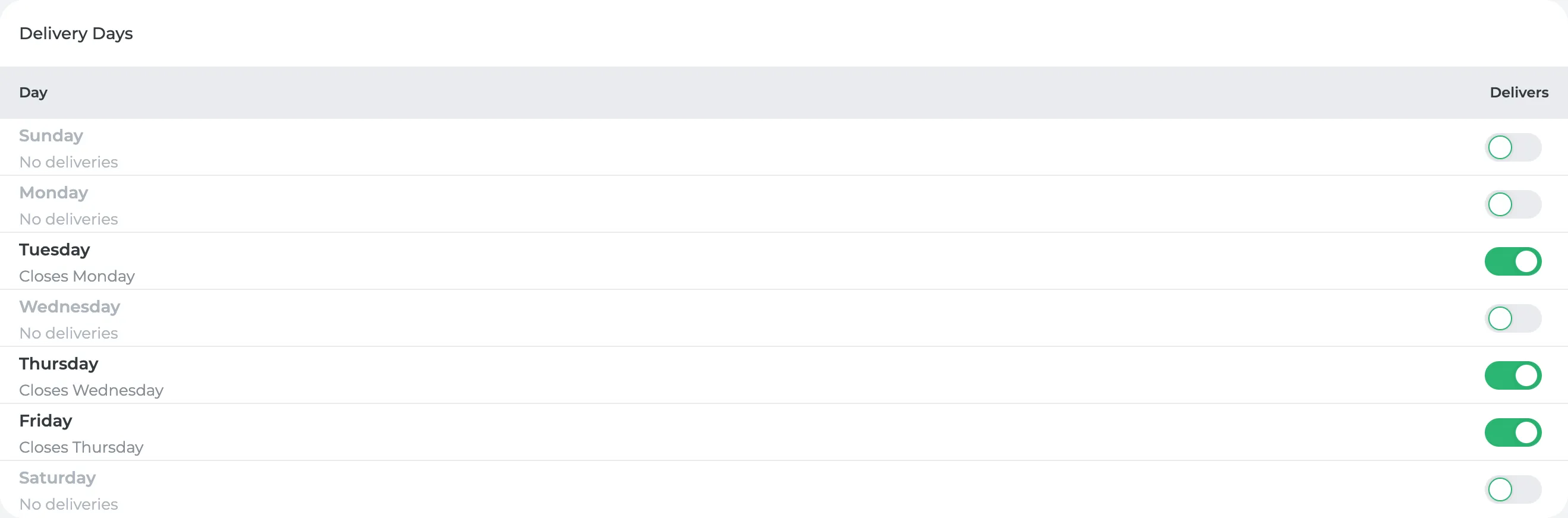
Under Delivery Days, turn on Delivers for each day you deliver. Each row shows when orders close for that day.
-
Click Save. If customers already have open orders, they keep the cutoff they were shown, and your changes apply to new orders.
Invite a customer
- Go to Customers and open the customer.
- In Locations, open the row's menu and click Invite Buyer.
- Check the buyer's email (the location's primary contact, or type one in) and tick the locations they order for.
- Click Send Invite.
The buyer gets an email from you with an Open My Ordering Page button. There's no password to set up. The link signs them in. If it expires after 24 hours, they click it again and can send themselves a new one.
What your customer sees
Their page has Orders, Menu and Recurring tabs. They click Place Order to start an order, or set up a Recurring order so the same one repeats without them asking. A customer with a price list sees only the products on it, at the list's prices.
What you'll see
Each order lands in Sales Orders under Open, already accepted, by the cutoff for its delivery day. It's priced from the customer's price list (or your standard prices), with your default sales tax unless the location is tax-exempt. If you'd already entered the same delivery by hand, no duplicate is created.
On the customer's Locations table, the Portal column shows Invited once you've sent the invite, and Self-serve once the buyer starts ordering.
Did this answer your question?
Thanks for letting me know.
Thanks. I read every one of these myself.